Start free

QR Menu for
Restaurants / Bars / Cafés

QR digital menu, online ordering and real-time analytics for your restaurant. You build your menu online in a few hours and update it instantly.

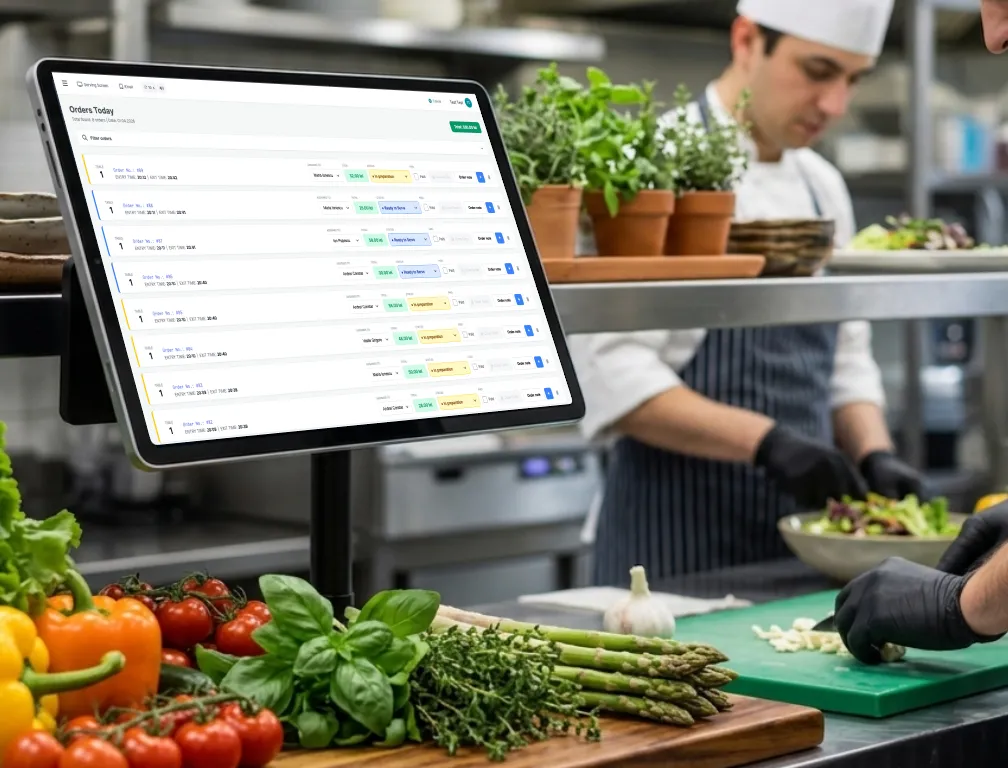
GoLoko — restaurant order screen
Why GoLoko

A printed menu costs you time and money. Every single time.

Every price change, every new dish, every allergen update — means redesign, reprinting, redistribution. Going digital cuts that entire loop.

📄
Endless reprinting

Changed a price? Added a dish? New allergen rules? Every update means a designer, a wait, and another print bill. Again.

📱
PDFs don't work on phones

Your guest scans the QR code and gets... a PDF. Zoom, pan, lose their place. It's 2026. Your guests deserve better.

📊
Zero insight into sales

Which dish flies on Fridays? Which one should you drop? A printed menu tells you nothing. You guess instead of knowing.

There's a better way to do all of this.

Features

Everything you need.
One single platform.

Depending on the plan you choose, you get a digital menu, online ordering, order status display, analytics, recommendations and product image generation with ✨ AI, plus many other industry-leading features.

★ Core feature

A digital restaurant menu, updated instantly

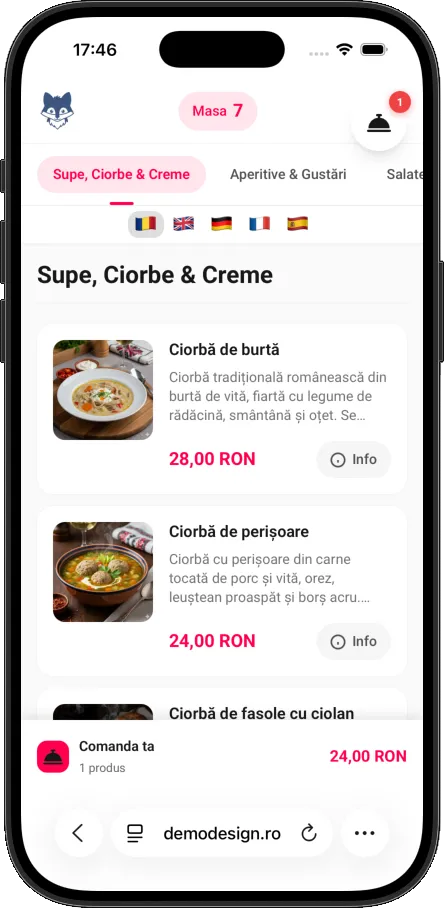
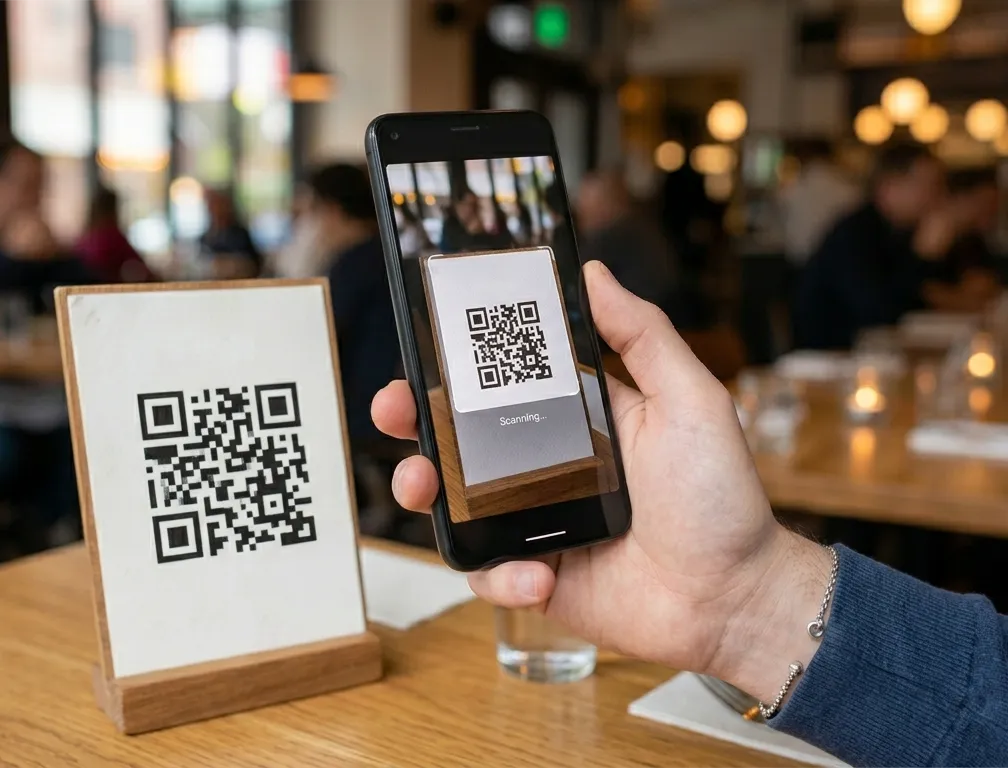
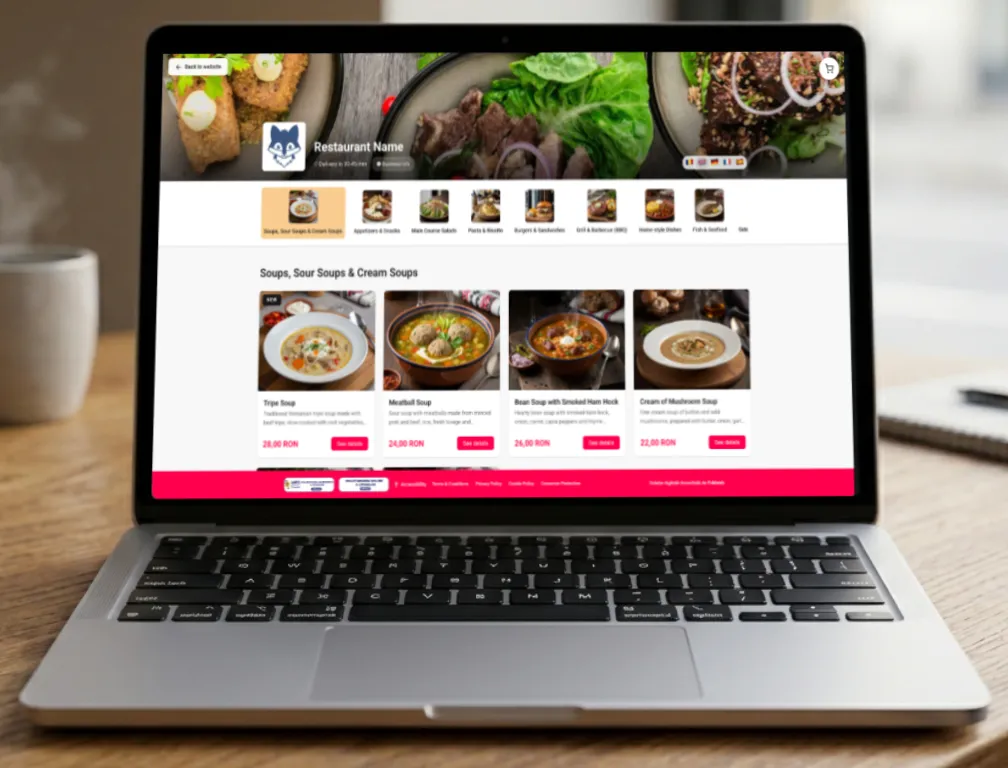
Change a price, add a dish, update allergens — it's live in seconds. Your guests scan a QR code at the table and get a beautiful menu, optimized for mobile. No app to download. No PDF.

GoLoko — restaurant menu app with QR code
🚚 Ordering

Online orders from your own website, even if you don't have an e-commerce platform

Add a simple button to your existing site that points to your GoLoko ordering page. Match the colors and it feels like guests never left your site. Your brand, your guests.

GoLoko — online orders from home
📈 Analytics

You know what sells. And what doesn't.

Top dishes, peak hours, staff performance, items that aren't moving. A real-time dashboard that tells you exactly where the money comes from — and where it doesn't.

0
Orders this month
0
Average order
0
Satisfaction rate
Top products
Tripe soup
187
Pizza Margherita
156
Papanași
132
Wiener schnitzel
104
House lemonade
81
Order type
Dine-in 52%
Delivery 31%
Pickup 17%
Peak hours
10
11
12
13
14
15
16
17
18
19
20
21
22
🍳 Kitchen

Orders land straight in the kitchen

Whether the guest orders from their phone or the server takes the order using their phone like a handheld — either way, the order shows up instantly on the kitchen screen. You track every order in real time, from the moment it comes in through preparation and service.

GoLoko — Kitchen Display System
📴 Guest display

Your guest knows exactly when their order is ready

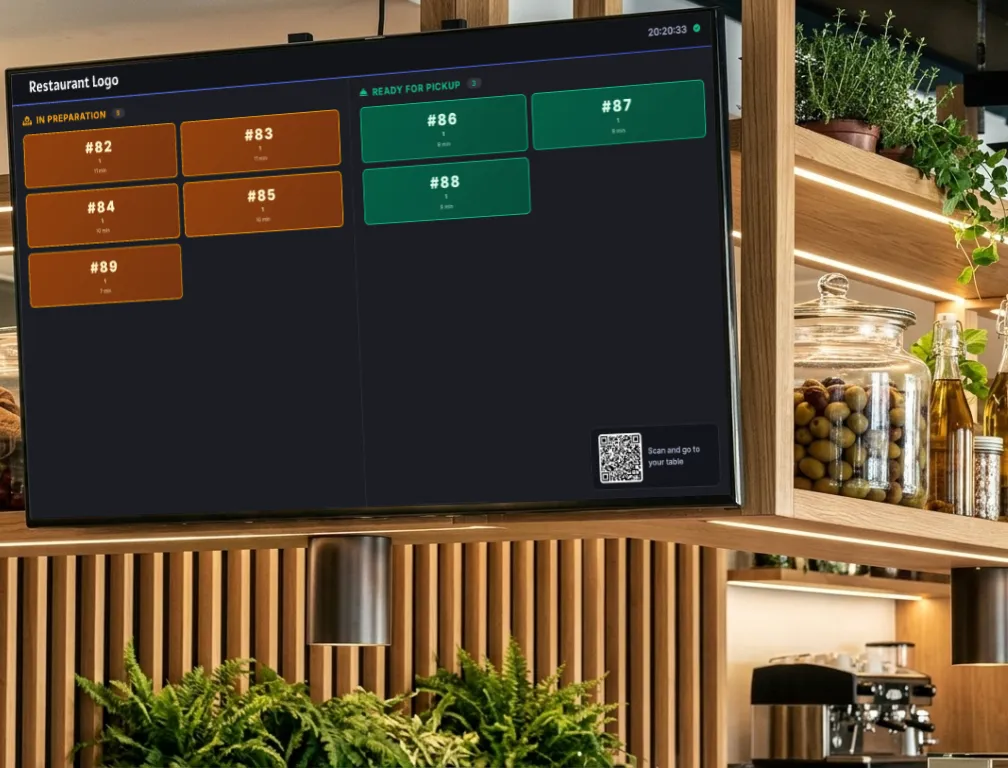
The Order Status Display (OSD) shows the status of every order in real time. The guest sees on the screen the moment their order is ready to pick up. Or they scan the QR code on the screen, take a seat at a table and follow everything on their own phone. Simple, transparent, no confusion.

GoLoko — Order Status Display
🖱
It also works as a self-ordering kiosk. Mount a tablet, switch on kiosk mode and your guests order on their own — simple self-ordering, no app, no extra investment.
Subscriptions

Four plans.
Find the one that fits.

The first line of each plan tells you whether it's right for you and your business, so you don't waste time on the details.

Choose this plan
Who this plan is for:

For bars, cafés and small restaurants that want a digital menu without buying an app. The menu is shown to guests on their phone when they scan the QR code, it's responsive, looks great on mobile — but the order is still placed with the server. For advanced features, take a look at the "Main Course" and "Feast" plans.

What you get exactly in this plan

Up to 300 products and up to 30 categories.

The most generous limit on the Romanian market for a free plan.

For each product you can show: name, image, description, allergens, weight, price, unit, visual tags ("New", "HOT", "BIO"), nutrition info (calories, protein, fat, carbs) and more.

Edit any detail, it goes live instantly.

Change a price, add a product, swap a photo — within 10 seconds, everyone who scans sees the change. No need to reprint the menu.

Generate your QR code right from the platform.

Print it, put it on tables, on the door or anywhere you like. Guests scan and see exactly what they want before they order.

The guest scans the QR code and a friendly menu opens on their phone.

No app to install. They tap a product and a window opens with large photos, the full description and allergens clearly marked.

1 user included on the free plan.

Heads up — a user is NOT an employee. It's a person who logs into the admin panel to edit the menu. Your restaurant can have as many servers and cooks as you like — they don't need to log into the app, because on the free plan orders are still taken by the server the usual way. If you have partners or co-workers you want to enroll in the platform (with rights to edit the menu, see analytics etc.), check out one of the other plans.

Complete documentation for managing the platform.

As soon as you create your account, you'll find a guide in the admin panel that walks you through every feature.

Important to know before choosing this plan

!
The app shows GoLoko branding.

If you want the app to look entirely yours — customized with your logo and colors — you'll need to choose the "Main Course" or "Feast" plan.

!
We reserve the right to display advertising.

To keep this service free, our team puts in real effort that translates into costs. We promise to show reasonable, non-invasive ads that won't bother your guests. If you'd still prefer no ads, you can choose one of the paid plans.

!
Guests can NOT order directly from their phone — the biggest limitation of the free plan.

They scan the code and see the menu with all products and details, just like consulting a printed menu or PDF, organized neatly by category — but they can only order through the serving staff, as with a printed menu. If you want them to order themselves, directly from the phone, without calling a server, choose one of the other plans.

Most popular Choose this plan
Who this plan is for:

For bars, cafés and small-to-medium restaurants that want more than a menu on display — full functionality, with orders placed directly from the phone. Guests scan the QR code and place the order directly, your staff is enrolled in the platform and manages orders with real-time statuses, and you see clear analytics about everything that's happening.

What you get exactly in this plan

Same as the free plan, you get:

Up to 300 products and up to 30 categories.

For each product you can show: name, image, description, allergens, weight, price, unit, visual tags ("New", "HOT", "BIO"), nutrition info (calories, protein, fat, carbs) and more.

Edit any detail, it goes live instantly.

Change a price, add a product, swap a photo — within 10 seconds, everyone who scans sees the change. No need to reprint the menu.

Complete documentation for managing the platform.

As soon as you create your account, you'll find a guide in the admin panel that walks you through every feature.

Extra / different from the free plan
Numbered QR codes, one for each table.

You generate them directly from the platform, one per table at your location. Each code is tied to its table — when the guest scans it, the order reaches you already tagged with the correct table number.

Orders show up at your end instantly, with sound and visual notifications.

The moment a guest taps "Send order", it appears immediately in your admin panel — no manual refresh, no notepad, no waving across the room. A sound and visual alert lets you know something new came in, so you don't miss anything even during the busiest hours.

Shopping cart, like in any online store.

The guest adds products with quantities, reconsiders, edits, removes, adds something else before sending the order, without having to flag anyone down. They can leave personal notes on the order (no onions, nut allergy, vegetarian etc.). When ready, they send it and get a unique number to track their order.

End-to-end order management in the admin panel.

You assign each order to a staff member or they pick it up themselves, depending on your internal flow. The employee tracks its progress and changes the status: new order → in preparation → ready to serve → served → closed. You get full history for the current fiscal year, filterable by date, table, server, status, value and more.

Dedicated kitchen display.

You can put a display in the kitchen that shows orders in progress in real time, sorted by age. Cooks see what needs doing right away, without anyone shouting orders. The screen refreshes automatically every time a new order comes in or a status changes.

"I want to pay" button for guests at the table.

No more waving a hand in the air. The guest taps the button, the server gets a notification to bring the bill.

"Add to order" button.

Want a coffee or a dessert after the meal? On the order confirmation page there's an "Add to order" button — tap it, pick the products, and the existing order updates automatically, no need to call a server.

Operational analytics.

How many orders you had in a day, week or month. Average order value. Peak hours. Top-selling products. Items that never sell ("zombies"), so you know what to drop. A printed paper menu won't give you any of this information that's so valuable for your business.

Your team can include one admin and up to 5 staff members for service.

The admin is the one who signs up for the plan and has the user account, with full rights. They can add up to 5 colleagues (servers, cooks) to the platform on this plan. The staff members don't get their own accounts. For more users or service staff, you'll need to choose the "Feast" plan.

Bilingual menu, your choice from 16 available languages.

For touristy areas (Romanian + English) or areas with Hungarian-speaking populations (Romanian + Hungarian), for instance. The guest can choose which language to view the menu in, right on their phone, after scanning the QR code. Just keep in mind you need to enter the information in both languages so it's visible in the menu. These days, any decent LLM (ChatGPT, Gemini etc.) can help you translate menu-specific information — titles, descriptions, ingredients — quickly and accurately.

Your own branding — your logo and colors.

You can set the app to display your logo and chosen colors instead of GoLoko branding. To the guest placing the order, it looks like your own app.

Upsell recommendations.

When a guest has, say, a pizza Margherita in their cart, you automatically suggest a special sauce, a dessert or anything else you'd like to sell alongside that pizza. You define the product pairings in the admin panel and the system suggests them at order time. Everyone wins. You raise the average order value with very little effort.

Important to know before choosing this plan

!
No home or office delivery orders.

This plan is built exclusively for orders inside the restaurant or your service location, whatever that may be. If you want to do deliveries and accept orders online, you'll need to choose the "Feast" plan.

!
No self-service tablet at the entrance (like McDonald's, KFC etc.).

If you want to give your guests the option to order from one or more kiosk-style tablets placed at the entrance, the "Feast" plan has this functionality built in.

!
No AI features (smart recommendations and image generation).

At €14 the recommendations are manual — you define from the admin panel which product gets suggested alongside another. For many business owners, that's enough. Also, you upload product photos yourself. If you want real-time AI recommendations (personalized for each guest based on what's in their cart) and the ability to automatically generate product photos with AI, upgrade to the "Feast" plan.

!
No integrations with external apps.

If you want your app to connect with accounting software (SmartBill, Oblio, Saga and others), e-Factura/SPV, fiscal printers or other HoReCa applications, you'll need to choose the "Feast" plan.

!
Orders reset at the start of each fiscal year.

Aggregated statistics (totals, top products, peak hours) remain available indefinitely for review. If you need full year-by-year history, switch to the Stand-Alone license.
Everything included Choose this plan
Who this plan is for:

For medium and large restaurants, with more staff, that want everything our platform has to offer. Restaurants that serve guests at the table AND deliver to homes or offices, or have self-service tablets at the entrance — and want to manage all those flows in a single place. Plus a menu shown in up to 5 of 16 available languages, AI-powered recommendations for your guests and automatic AI-generated product photos — all included, in a package that costs about a coffee a day.

What you get exactly in this plan

Same as the €14 plan, you get:

Up to 300 products and up to 30 categories.

For each product you can show: name, image, description, allergens, weight, price, unit, visual tags ("New", "HOT", "BIO"), nutrition info (calories, protein, fat, carbs) and more.

Edit any detail, it goes live instantly.

Change a price, add a product, swap a photo — within 10 seconds, everyone who scans sees the change. No need to reprint the menu.

Complete documentation for managing the platform.

As soon as you create your account, you'll find a guide in the admin panel that walks you through every feature.

Numbered QR codes, one for each table.

You generate them directly from the platform, one per table at your location. Each code is tied to its table — when the guest scans it, the order reaches you already tagged with the correct table number.

Orders show up at your end instantly, with sound and visual notifications.

The moment a guest taps "Send order", it appears immediately in your admin panel — no manual refresh, no notepad, no waving across the room. A sound and visual alert lets you know something new came in, so you don't miss anything even during the busiest hours.

Shopping cart, like in any online store.

The guest adds products with quantities, reconsiders, edits, removes, adds something else before sending the order, without having to flag anyone down. They can leave personal notes on the order (no onions, nut allergy, vegetarian etc.). When ready, they send it and get a unique number to track their order.

End-to-end order management in the admin panel.

You assign each order to a staff member or they pick it up themselves, depending on your internal flow. The employee tracks its progress and changes the status: new order → in preparation → ready to serve → served → closed. You get full history for the current fiscal year, filterable by date, table, server, status, value and more.

Dedicated kitchen display.

You can put a display in the kitchen that shows orders in progress in real time, sorted by age. Cooks see what needs doing right away, without anyone shouting orders. The screen refreshes automatically every time a new order comes in or a status changes.

"I want to pay" button for guests at the table.

No more waving a hand in the air. The guest taps the button, the server gets a notification to bring the bill.

"Add to order" button.

Want a coffee or a dessert after the meal? On the order confirmation page there's an "Add to order" button — tap it, pick the products, and the existing order updates automatically, no need to call a server.

Operational analytics.

How many orders you had in a day, week or month. Average order value. Peak hours. Top-selling products. Items that never sell ("zombies"), so you know what to drop. A printed paper menu won't give you any of this information that's so valuable for your business.

Extra / different from the €14 plan
Import products from an Excel or CSV file.

You download the template file from the platform. Fill in your product info. Upload it back. And your products are ready to sell — you only need to add images and maybe make small adjustments.

Online ordering with home or office delivery.

The guest fills in their address, phone and notes for the driver. In your admin panel you clearly see which orders are "at the table" and which are "delivery". The dedicated home-ordering page looks like an online store. You can customize it with your branding and colors. And you can embed it on your own site or promote it on printed materials. Heads up — GoLoko doesn't work like Tazz, Wolt, Glovo or similar services. We don't have our own riders or cars and we don't charge commissions. Every restaurant that chooses to use our tools for off-premise ordering is responsible for organizing its own deliveries.

Self-service kiosk tablet at the entrance.

You can set up one or more tablet stands at the entrance (like at KFC, McDonald's etc.). Guests can order on their own, using the dedicated interface that comes with this plan.

Stock management with automatic decrement.

Each product can have a stock level set. When someone orders, the stock drops automatically. When it hits zero, the product either hides from the menu or shows "sold out" — your choice. You get low-stock alerts so you can reorder ingredients from your supplier in time.

A far more generous limit for users and service staff.

You can have up to 3 admin accounts, 3 user accounts and up to 30 staff members enrolled for service, all managing orders. More than enough for any large restaurant.

Menu shown in up to 5 languages, your choice from the 16 available.

You pick the 5 languages that best cover your audience (Romanian + English for tourism, plus 3 more based on your local needs). Foreign guests can choose what language to view the menu in on their phone after scanning the QR code.

100% your own branding — logo, colors, fonts.

The app, the home and office ordering page, the self-service kiosk — they all look as if they were built for you. You control the logo, the colors, the fonts.

AI-powered upsell recommendations — included in the plan.

When the guest adds products to the cart, AI automatically suggests items that go well together — in real time, personalized for each guest. Example: "Got a Pizza Margherita in your cart? Try this special house sauce."

No separate account, no API key, no hassle — everything is set up in the admin panel. The plan includes 3,000 orders with AI recommendations. Our advice is to also have your manual recommendations set up correctly. If, say, in a busy month you reach the limit early, the system automatically switches to the manual recommendations you defined — your guests won't feel a difference.

AI-generated product images — included in the plan.

No time or energy to shoot professional photos for every product? Generate them straight from the admin panel with a click. AI builds the photo automatically based on the product name and description.

Monthly limit: 100 AI-generated images. If you hit the limit, you can still upload your own real photos or wait for the next 100 images you can generate the following month.

Important — read carefully.

AI-generated photos are automatically marked "Illustrative image" on the public menu — guests know these are illustrative previews, not exact photos of the dishes served. Legal protection for you, transparency for the guest.

Editable legal pages of your own (Terms, GDPR, Cookies).

Because this plan also allows off-premise deliveries and involves data collection, we give you all the tools you need from a legal standpoint: ANPC SAL-SOL banners, terms and conditions, cookie policy, privacy policy and so on. These pages come pre-filled with the information you entered at signup and are ready to go live. That said, we recommend you consult your own lawyer or DPO (Data Protection Officer) for any adjustments to better fit your business. You need to understand that we provide generic text that offers minimum legal compliance, because we want to help you get started faster. But responsibility for legal compliance is 100% yours and you need to take all the necessary steps — our company is not responsible for how each restaurant handles its guests' data.

External app integration capability.

The €39 plan gives you the option to connect our platform to other systems you already use: delivery platforms, accounting software, fiscal printers or existing POS systems, other HoReCa apps and so on.

Important — read carefully.

The integration is NOT automatic just by choosing the €39 plan. We can't know which apps each restaurant uses or what integrations they want with them. An employee with technical skills or an external developer needs to connect our platform to the external platforms, using the documentation you receive after subscribing. In this plan we give you access to everything you need from our platform's side — you make sure the other side (the external app) is configured to receive and process the data.

Important to know before choosing this plan

!
Orders reset at the start of each fiscal year.

Aggregated statistics (totals, top products, peak hours) remain available indefinitely for review. If you need full year-by-year history, switch to the Stand-Alone license.
Most customizable Request the license
Who this license is for:

For business owners and restaurants that want to own the platform — the code, the server, all the data. One-time payment, the app becomes yours: you install it on your own domain, customize it with your own branding and extend it further as your business needs. The license covers one company and one location. If you have multiple restaurants and want to bring them all under Stand-Alone, we'll discuss separately and put together a package that covers exactly what you need.

What you get exactly in this plan

Everything you get in the "Feast" plan.

Full product catalog, order management, home and office delivery, self-service tablet, kitchen display, AI recommendations and images, external app integration capability, 16 languages, 100% your own branding, editable legal pages, advanced analytics, etc.

The app becomes yours.

We handle the installation on your server (included in the price). From there, you control everything: the app code, the data, the hosting.

One-time payment — no monthly subscription.

After this amount, zero recurring costs. That said, if you have certain ideas or custom developments in mind and want to work with our team — being the natural choice since we built the platform and know it best — you can reach out and we'll discuss specifics. You can also choose to work with other developers, but keep in mind we only offer a warranty for work done by us. Developments by third parties are not covered by the warranty.

No product or category limits.

The 300 products + 30 categories cap is gone. Add as many as you like.

Orders and analytics do NOT reset at the start of the fiscal year.

You keep all historical data indefinitely. Compare July 2026 with July 2030 if you want. As long as you have generous enough hosting to keep all that data.

1-year warranty and technical support.

We help you for a full year after installation with technical issues related to our setup. Heads up: the warranty is valid only if the app isn't modified by third parties. Any in-house changes fall outside our area of responsibility.

Extensible with custom development (charged separately)

Want a feature that isn't in the standard package? You can request it from our team or hire your own developer, at a cost evaluated individually.

See how it works

Don't take our word for it. Watch.

From scanning the QR code to picking up the order. The whole process, in a few minutes.

GoLoko presentation video
Digital menu • Online ordering • Analytics • Order Status Display
We comply with the law

Built-in compliance.

🔒
GDPR compliant
Consent, privacy, data rights
🌾
14 EU allergen categories
Regulation 1169/2011
Accessibility
7 accessibility options included
🔗
No app to download
Everything runs in the browser
📱
Mobile-first
Optimized for phone and tablet
🔐
SSL encrypted
Secure data transfer
Frequently asked questions

Frequently asked questions

Sure, with the "Feast" plan or the Stand-Alone license you can take home or office orders similarly to most platforms on the market. Initially, GoLoko and delivery platforms complement each other. The advantage with GoLoko is that you don't pay commissions on orders. Over time, as more and more of your guests choose to order directly through your interface, you might discover on your own that your reliance on other platforms naturally decreases. One thing to keep in mind: we don't deliver. We give you the menu and ordering platform. You organize deliveries with your own team.
The skills needed are minimal and come down to knowing how to fill in a few online forms, upload images and tick options. Anyone on your staff with basic experience using a website can do the whole setup with their eyes closed. On top of that, we provide video tutorials to make things even easier. For the Stand-Alone option, we handle the installation, but you'll still need to configure the restaurant details, enter the products and so on.

Free plan ("Appetizer"): There's no payment, so no wait. You create your account, fill in the basic info about your location and can start posting the first products within minutes.

Paid monthly plans ("Main Course", "Feast"): After paying the first invoice and sending us the proof of payment, your account is activated within an hour at most. From that moment you can start customizing at your own pace. It might take a few hours if you have your information ready in digital form, or a day or more if you're copying it from a printed menu, photographing products and so on. Once you're happy with how everything looks, you generate the QR codes directly from the admin area, place them on the tables and from that moment orders can come in digitally.

Stand-Alone license: After signing the contract we issue the proforma for the full amount. After payment is confirmed, you provide us with the access credentials for where the app will be hosted — either on a standalone domain, a subdomain of the restaurant's site, or a separate folder. Installation happens within 5 working days of payment and credentials being received. Depending on workload, it can happen the same day. The timeline also depends on how quickly you provide the data we need. All these conditions are spelled out in a transparent contract we sign together.

Yes and no, depending on who's looking. For you, yes — it's a complete web app for managing your restaurant menu: you add products, categories, prices, images, allergens, translations. You use it daily from any browser, on any device. For your guests, no — they don't download anything. They scan the QR code at the table and the menu opens directly on their phone.
No. GoLoko works entirely in the browser. Guests scan a QR code or open a link — the menu opens instantly on their phone. No app store, no installation, no fuss.
You keep the paid plan and all its features until the last paid month expires. After that, the account is automatically moved to the Free plan, with all that plan's limitations applied.
No, not in our current business model. In the future things may change depending on how the market evolves — but our priority remains to offer more and more tools for the same fixed subscription, not to introduce commissions. Use the free plan with confidence, with its specific limits, or choose one of the paid plans. Either way, whether you have 10 orders a month or 10,000, the price stays the same.

The "Appetizer" and "Main Course" plans: technically yes, you can place a link to the GoLoko menu, but there's no clear benefit. The purpose of these plans is to serve the location internally, with QR codes that show the menu to guests sitting at the table. A link on your website doesn't bring real value.

The "Feast" plan: actually recommended. This plan gives you a dedicated page that looks like an online store where guests can order food for home or office delivery. As long as you can fulfill the deliveries, it would be a shame not to put the link on your site, on social media and on printed materials.

Stand-Alone license: even simpler — the app installs on a subdomain or subfolder of the site and effectively becomes part of the site, regardless of what platform it's built on.

Both SaaS plans and Stand-Alone licenses are granted per company AND per location, cumulatively. The settings include both the legal details of the company and the branding of the location that will be shown to the public. A single company can run multiple restaurants, which may be named differently and create plenty of confusion among the public — a situation we try to avoid. Plus, on SaaS there are product, category and image limits that wouldn't be enough for 2-3 locations. While in theory the Stand-Alone app could be modified to handle orders from multiple locations, and we understand it might be tempting to buy once and use in several places, we discourage this through the contract and reserve the right to take legal action if the license is violated.

That said, for business owners who run multiple locations and want to use the platform for all of them, we're open to finding a reasonable solution together. For example, a special license for 3 locations could cost roughly between €2,300 – €2,500 instead of €2,970. This is purely indicative — the final price depends on the number of locations, specific needs and any platform changes required.

SaaS plans: There are several levels of help. As a first step, if the issue is that you don't know where something is managed from, you'll turn to the tutorials. If those don't solve it, you can contact our support team and we'll be happy to help, prioritizing paid plans. But regardless of the plan, no question will go unanswered. Last but not least, if the issue is a functional one that impacts orders, you'll report it to our support team and we'll make sure to fix it as quickly as we possibly can.

Stand-Alone license: There's a 1-year warranty for proper operation, during which any reported bug is fixed for free. This applies only if no third-party developer touches the code during that interval — we can't take responsibility for work that wasn't done by us. We also can't take responsibility if the restaurant's hosting has issues or goes down. As common sense, in both cases, management should keep printed menus as a backup for any unforeseen situation.

Occasionally, we run short-term promotions on the SaaS plans. Examples: paying a year in advance can earn you 2 free months, a first free month, or a longer free period under certain conditions. These are purely occasional and we reserve the right to decide when and how we do them, based on our business interests. To actually try out the platform, we maintain a fictional restaurant account permanently set up, which we can give access to anyone interested to test features before buying.

Request demo access

Request demo access

Fill in the form and we'll get back to you with the access details.

Request the Stand-Alone license

Fill in the form and we'll get back to you with all the details about the full license.

Ready?

Your menu, digitalized today.

Start with the demo. See for yourself. When you're ready, you're one click away.